Trimble Unity Construct sync is a feature that has to be enabled per account.
This feature gives you the ability to synchronize your Trimble Unity Construct folders with a server so that you can transfer documents between the two. This feature is used to upload / download multiple files at once. It is also an alternative for using the Multi-File Upload feature that appears when uploading documents.
Enabling Trimble Unity Construct sync allows you to upload and download files and folders between Trimble Unity Construct and your computer using a third-party tool.
After this is set up, users can then set up WebDAV credentials for themselves. Account administrators can view and revoke WebDAV app-password credentials for any user within their account.
For a description of the fields and buttons located on this tab, see Document Options Tabs Overview.
To set up Trimble Unity Construct Sync
- From the top navigation tabs, click the Setup tab or from the Utility menu by clicking the drop-down arrow next to your user name.
- In the Administration Tools section, click Documents.
- Click Document Options.
- On the e-Builder Sync tab, select the Enable Trimble Unity Construct Sync check box.
- To enable listing projects, select the Enable Listing Projects check box.
- In the Define Account Short Name for Login field, enter a short name for your account. This name is used to identify the account when using the Trimble Unity Construct WebDAV Service. This is a required field.
- Click Save.
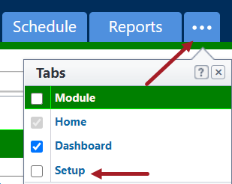
If the Setup tab is not visible, click  , and then select the Setup check box.