WebDAV Credentials
WebDAV credentials allow you to use your computer's file browser or an app to open, edit, and synchronize files and folders.
In Trimble Unity Construct, you can create, view and revoke WebDAV app-password credentials for your account.
Prerequisites
Before the configuration steps can be completed, sync must first be enabled for your Trimble Unity Construct account.
Important Notes
- App passwords are different from your Trimble Unity Construct login password.
- Each app password works across all your accounts.
- Your username format (accountShortName\login) does not change.
- If your app password stops working, check if it has been revoked or expired in My Settings.
Manage Your WebDAV Credentials
- View all your WebDAV credentials in Setup > My Settings > Personal Information > WebDAV Credentials. Each credential shows its label, prefix (first 8 characters), creation date, and last-used date.
- You can have up to 10 active credentials.
- To revoke a credential, click the Revoke button next to it. The credential will stop working immediately.
 To access the WebDAV Credentials page
- Go to My Settings.
- Click Personal Information.
- Click WebDAV Credentials.
The WebDAV Credentials page is displayed with a list of the available credentials and their statuses. The number of total credentials, and the number of active, expiring soon and expired credentials are shown at the top of the page.

To create and setup a WebDAV app password
- On the WebDAV Credentials page, click Create New Credential.

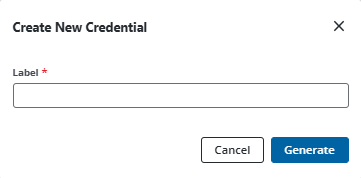
- In the Create New Credential popup, enter a label to identify this credential. (For example, "My Syncovery laptop" or "Cyberduck office")
- Click Generate.
- From the Credential Created popup, click Copy to copy the generated secret (password) immediately.
Copy and paste this password into your WebDAV client's password field as it will not be shown again. The username is the same as your login. Ensure that you also make a note of your username format as shown in the Credential Created popup.
- In your WebDAV client (Cyberduck, Syncovery, etc.), configure the connection:
- Server: Enter your e-Builder WebDAV URL.
- Username: Enter the username in the following format (accountShortName\login). This format is shown in the Credential Created popup when you generated your WebDAV credential.
- Password: Paste the generated app password.
- Test the connection.
To revoke WebDAV credentials
- On the WebDAV Credentials page, click Revoke beside an active credential you wish to revoke.
- Click Revoke to confirm.
The credentials are revoked and it will stop working immediately.
Frequently Asked Questions (FAQs)
Is the WebDAV credential's password the same as my Trimble Unity Construct login password?
A WebDAV secret or password is generated specifically for external file synchronization. This is different from your Trimble Unity Construct login password. Having separate WebDAV credentials improves security by isolating WebDAV access from your main Trimble Unity Construct account.
What if I forget my credential's password?
If you lose or forget a credential's password, revoke it and create a new one.
Does my WebDAV credential's password expire?
Yes, your WebDAV credential's password will expire in 12 months.