April 2023 Release Notes
e-Builder Mobile App: Update your e-Builder mobile app to get the latest features.

April 21 - Web
 What's New
My Home - Account Announcement Formatting
Administrators will now be able to use various formatting options while creating announcements that display in the Announcements widget on My Home.
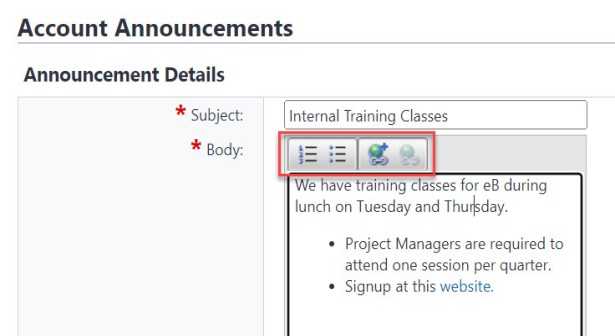
Formatting options in Account Announcements
While creating the announcement, the following options will be available on the Announcement Details page (Setup> Administration Tools> Settings> Announcements):
- Numbered List
- Bullet List
- Insert Link
- Remove Link (This option will be enabled only when a link has been selected in the announcement.)
To include a link to an email address in the announcement, select the link text, click the Insert Link button and then enter "mailto:" followed by the email address in the URL field.
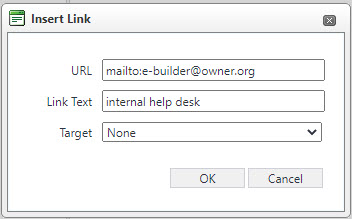
Insert Links in Account Announcements
Resource Center
The new Resource Center provides a centralized location for all reference materials under the  icon located on the top banner in Trimble Unity Construct. With this update, some links such as those for the Community and Product ideas portals have been moved to the Resource Center.
The Resource Center also includes in-app release notes and tutorials that you can re-watch at any time.
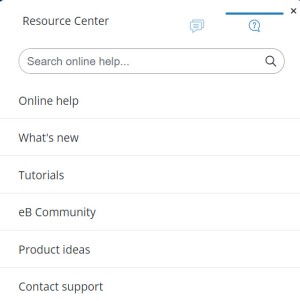
Resource Center
The following options are available on the main tab of the Resource Center:
- Search Online Help - Enter search criteria to find results from Trimble Unity Construct's Online Help documentation.
- Online Help - Access the context-sensitive Online Help page that provides documentation about the current page of the application.
- What's new - Access in-app Release Notes with links to the detailed Online Help Release Notes pages and links to the monthly Release Video, when available.
- Tutorials - View step-by-step walk-through guides for product features in Trimble Unity Construct.
- eB Community - Access the Community website.
- Product Ideas - Access the Trimble Unity Construct Product Ideas portal.
- Contact support - View Trimble Support contact details on the Online Help.
The Feedback tab of the Resource Center allows you to submit general feedback such as new product ideas, comments or suggestions, or feedback about issues with Trimble Unity Construct.
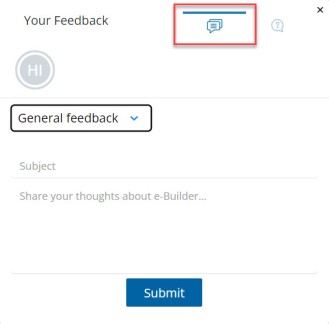
Feedback tab of the Resource Center
Grid Export Updates
Various grids throughout Trimble Unity Construct have been updated to export Excel files without rich text formatting while honoring correct data types.
The following updates have been made to the behavior of the “Export to Excel” tool on the grids:
- The Excel spreadsheet now includes all records in the grid, regardless of the number of records displayed on the page.
- The Excel spreadsheet includes only the filtered records if there are any filters applied to the grid at the time of export.
- Rich Text formatting and the account logo are no longer included in the Excel spreadsheet.
- The exported values in the Excel spreadsheet will honor the data types of the fields in the grid (For example, any numerical fields will be exported as numbers, any date fields will be exported as dates).
Cost pages with Grid Export updates
To date, the following Cost pages have been updated with the above behavior:
- Cost\Budgets\BudgetDetails.aspx
- Cost\Budgets\BudgetChangeDetails.aspx
- Cost\Actuals\ActualsMain.aspx
- Cost\Actuals\CommitmentInvoiceDetails.aspx
- Cost\Actuals\GeneralInvoiceDetails.aspx
- Cost\Commitments\CommitmentsMain.aspx
- Cost\Commitments\CommitmentDetails.aspx
- Cost\Commitments\CommitmentChangeDetails.aspx
- AccountLevelCost\MasterCommitments\MasterCommitmentDetails.aspx
- AccountLevelCost\MasterCommitmentChanges\MasterCommitmentChangeDetails.aspx
- AccountLevelCost\MasterInvoices\MasterInvoiceDetails.aspx
- AccountLevelCost\Funding\AccountFundingDetails.aspx
Non-Cost pages with Grid Export updates
To date, the following non-cost pages have been updated with the above behavior:
- Companies\index.aspx
- Companies\CompanyDetails.aspx
- Companies\ProjectCompanies.aspx
- Companies\CompanyDetails\Commitments.aspx
- Companies\CompanyDetails\ActualCosts.aspx
- Companies\CompanyDetails\Bidding.aspx
- Companies\CompanyDetails\ConstructionCodes.aspx
- Companies\CompanyDetails\MasterCommitments.aspx
- Companies\CompanyDetails\MasterInvoices.aspx
- Contacts\ContactDetails.aspx
- Contacts\index.aspx
- Documents\AccessDocumentHistory.aspx
- Forms\FormFieldHistory.aspx
- Forms\History.aspx
- Processes\ProcessesMain.aspx
- Processes\RoutingHistory.aspx
- Schedule\ActivitiesMain.aspx
- Schedule\SchedulesMain.aspx
- Setup\Admin\Users\ViewUser.aspx
- Workflow\DraftItems.aspx
- Workflow\StartWorkflow.aspx
DocuSign Integration Updates (Trimble Unity Construct Admins for DocuSign clients only
This update provides enhanced flexibility for system users who are associated with more than one DocuSign account by allowing them to select a desired account for Trimble Unity Construct.
While authenticating the DocuSign integration with Trimble Unity Construct, Admins with multiple DocuSign accounts will be asked to select the account that they would like to integrate with Trimble Unity Construct.
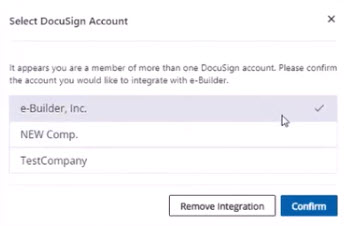
DocuSign Account Selection
Reminder of Approaching Deadline
Prior to September 30, 2023, all DocuSign client Trimble Unity Construct Admins must authorize Trimble Unity Construct to access their DocuSign account using our new OAuth 2.0 authentication protocol. For more information on how to authenticate your existing DocuSign account, see DocuSign Authentication in the Online Help.
Following successful authorization, Trimble Unity Construct Admins must notify Trimble Unity Construct Support and Support will then activate OAuth 2.0 authentication on future DocuSign process instances.
Resolved Cases
The following issues have been resolved:
AppXchange
- Resolved issues that caused scheduled Data Warehouse (DWH) jobs to fail without being completed. (Case# 507968)
-
Removed an unintended custom field filter from Company Imports to allow all the fields to be supported. (Case# 509749)
Bidder Portal
- For Public Bid invitations, resolved an issue stemming from a recent change that added account ID and project ID to Public Bid Invitation URLs, in addition to the previously required bid package ID. If respondents used the older URL links, they received an error. Updated the system to handle both the older URLs as well as the new URLs. (Case# 508003)
- The Public URL on the Bid Package Details page was incorrect. This issue has now been resolved. (Case# 508043)
Cost
- Corrected export behavior to honor the correct data types when Exporting to MS Excel. Numbers in a grid are exported as numbers and not as text strings. (Case# 504453)
Documents
- Resolved an issue where documents were not being attached to Blue Beam sessions after selecting them from "Browse for files". (Case# 506088)
- Resolved an error that prevented the redline markup window from being opened. (Case# 510897)
Forms
- On Form instances, the system will now ensure that the default folder path does not get cleared after uploading the first file. Any subsequent file uploads will be stored in the default folder. (Case# 507020)
Processes/ Workflow
- Admins can now delete process data fields that are only in use on process instances of "soft deleted" projects. Note if the data fields are in use on any existing projects, they cannot be deleted. (Case# 502223)
- Previously, when editing the Commitment Change Item Number in a Commitment Change process, the current commitment amount was rounded up to the nearest 10¢. This behavior has been corrected to preserve the originally entered decimal values without rounding. (Case# 503577)
Projects
- Fixed an issue with applying a project template (including folders and their permissions) due to a deleted parent folder. (Case# 506340)