Delete Workflows (Time Tracking)
To delete time tracking workflows
- From the top navigation tabs, click the Setup tab or from the Utility menu by clicking the drop-down arrow next to your user name.
- In the Administration Tools section, click Workflow.
- On the Workflows page, click Delete beside the workflow you want to delete.
Every account must always have an Account Default Workflow for each type of workflow that exists. Therefore the Delete option for the Account Default workflow will be disabled and not available. The first workflow created for each type (i.e. Time Tracking) will be marked as the Account Default. In order to change the Account Default you must create a new workflow and select the Account Default check box, which will then have the original Account Default unselected.
- On the Confirm Deletion page, you will be asked to enter a note to confirm the action. This is mandatory.
- Click Yes, Delete to confirm.
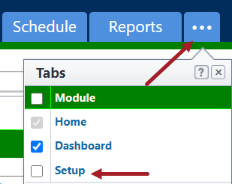
If the Setup tab is not visible, click  , and then select the Setup check box.
Related Topics: