Trimble ID (TID)
As part of our commitment to providing a seamless, single-identity login, we are excited to announce that Trimble Unity Construct will soon transition to Trimble ID for sign-in.
To view and download Trimble ID Adoption FAQs for Trimble Unity Construct, see The Network.
Why Are We Making This Change?
This upgrade aligns Trimble Unity Construct with the modern Trimble ecosystem, ensuring your team benefits from the latest advancements in security and seamless connectivity
- Enhanced Security Standards: Trimble ID elevates security for all user accounts by continuously aligning our authentication system with the latest cybersecurity best practices. Key features include default Two-Step Verification (2SV) and improved Single Sign-on (SSO) capabilities.
- Unified Access: Trimble ID credentials now grant access to the broader Trimble ecosystem. Trimble Unity Construct users with multiple Construct profiles associated with the same email address will benefit from a unified experience.
- Foundation for Future Innovation: Trimble ID is a prerequisite for enabling future features and advanced technologies, such as AI, by providing robust security and a unified platform.
What is Changing?
We are elevating the security and user experience of Trimble Unity Construct by transitioning from legacy application-specific credentials to the corporate standard: Trimble ID.
- New Login Credentials: While the username is retained, users will no longer use their legacy Construct password. Instead, they will log in using their email address and new Trimble ID password.
- Security Upgrade: Includes Two-Step Verification (2SV) by default and offers Single Sign-on (SSO) capabilities.
- Username Consistency: Existing Trimble Unity Construct usernames will remain the same and will not change during this process.
What is Trimble ID?
Trimble ID (TID) is Trimble’s identity provider service, enabling customers to log in to TID-enabled applications with a single set of credentials. Trimble ID includes Two-Step Verification (2SV) by default and offers enhanced Single Sign-on (SSO), providing increased security and enabling customers to easily use other Trimble cloud services.
Trimble ID is used to store and enforce passwords policy, including password length, complexity, history, expiration, and number of login attempts before lockout.
Account Administrator Process to Enable Trimble ID
For general Trimble ID guidance, see the Trimble ID page.
 Step 1: Request TID Enablement
Account administrators must first request Trimble ID account enablement and then accept the invitation to become the Primary Account Owner for the account. Upon completion of this step, a request is sent to Tech Support to designate the Admin user as the TID Primary Account Owner.
Trimble ID (TID) owners can activate TID and turn on Trimble ID (TID) to access other Trimble products.
Best Practice: Trimble strongly recommends that only one person request and manage TID enablement. Avoid using a shared login for this process.
The Primary Account Owner will be responsible for the TID enablement so make sure you are the designated Primary Account Owner for your organization.
To request TID enablement
- From the top navigation tabs, click the Setup tab.
- In the
- In the Trimble Unity section, click the Request TID button. An email ticket with your user details will be sent to the Tech Support team.
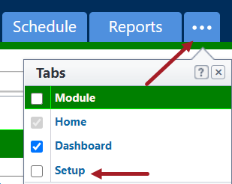
If the Setup tab is not visible, click  , and then select the Setup check box.
 Step 2: Accept Invitation & Complete TID Sign-up
Accept the TID invitation email and finish the TID sign-up process by creating a Trimble ID or signing in with your existing TID. After completion, you will now be the TID Account Admin.
See Create a Trimble ID in the Trimble Account Services documentation for more details on setting up a Trimble ID.
To complete the TID sign-up when a TID account already exists for the email address
- Click the link in the Trimble Invitation - Sign in email.
Your email address is automatically entered on the TID login page that opens. - Click Next and enter your password.
You are now the Primary Account Owner in TID for your organization’s Trimble Unity Construct account.
Please enable Two-Step Verification (2SV) for your TID account if it is not currently enabled.
To complete the TID sign-up to create a new TID account for the email address
- In the Trimble Invitation - Create Account email, click the Click here link to accept the invitation.
- Provide the required details in the following fields:
- Enter your First Name.
- Enter your Last Name.
- Review the terms and conditions, select the check box, and then click Agree and continue. A unique code is sent to your email.
The code sent via email expires in 10 minutes.
- Retrieve the code from your email and enter it in the Verification Code field.
- Create and enter a password that meets the complexity requirements shown on the screen. Confirm your password and click Submit. The secure passkey page opens.
- On the Account Preferences page, confirm your information and click Next. If you created a passkey, you can set up additional 2SV methods in the next step. If you did not create a passkey, set up at least two 2SV methods in the next step.
- To set up Two-Step Verification (2SV) through Trimble ID, click Count me in.
- When setting up 2SV, enable additional authentication methods in case you lose access to your first 2SV method.
Your Trimble ID has been created. Going forward, you must sign in using your Trimble ID.
Step 3: Set Password Policies
Establish the account password policies prior to enabling TID to ensure that users create their TID account in accordance with your organization's password requirements.
The existing password policies governing your Trimble Unity Construct account are not extended to Trimble ID (TID).
To set up Account Preferences
- Click the Manage password policy in TID link on the Security page or navigate to https://accountsecurity.id.trimble.com/ and log in with your TID credentials.
- To set account password policies, click Change Requirements.
- Update the password policies to your requirements, then click Apply Changes.
The account password policies are now applied.
Step 4: Enable TID in Unity Construct
Once enabled, access to Trimble Unity cannot be disabled.
To enable TID
- From the top navigation tabs, click the Setup tab.
- In the
- In the Trimble Unity section, select the Access to Trimble Unity check box to enable TID for all products.
Selecting the check box does not immediately save the setting.
- To confirm the action to enable TID, click Turn on.
Once enabled, it cannot be disabled. This will deactivate the password policy on this page. After you save these settings, existing users will be automatically invited via email to create their new TID account.
- Click Save to apply the settings and enable TID. Existing users will be automatically invited via email to create their new TID account.
- To confirm the TID activation, click Save.
- Wait for the invitation process to complete. Do not close the page before this action is finalized. Users may not receive the invitation if the process is incomplete.
A confirmation message will display when TID has been successfully enabled for your account.
If the Setup tab is not visible, click , and then select the Setup check box.
User Process to Setup Trimble ID
For general Trimble ID guidance, see the Getting Started with Trimble ID page.
Each user must use the link provided in the invitation email to complete signing up with TID. Note that users must set a Two-Step Verification (2SV) at account creation.
Creating or having a Trimble ID outside the invitation does NOT grant access to Trimble Unity Construct!
Step 1: Accept Invitation & Complete TID Sign-up
Accept the TID invitation email and finish the TID sign-up process by signing in to an existing TID or creating a Trimble ID. After completion, you will now be able to log in to Trimble Unity Construct using TID credentials.
See Create a Trimble ID in the Trimble Account Services documentation for more details on setting up a Trimble ID.
To complete the TID sign-up when a TID account already exists for the email address
- Click the link in the Trimble Invitation - Sign in email.
Your email address is automatically entered on the TID login page that opens. - Click Next and enter your password.
You have successfully accepted the TID invitation.
To complete the TID sign-up to create a new TID account for the email address
- In the Trimble Invitation - Create Account email, click the Click here link to accept the invitation.
- Provide the required details in the following fields:
- First Name: Enter your First Name.
- Last Name: Enter your Last Name.
- Review the terms and conditions, select the check box, and then click Agree and continue. A unique code is sent to your email.
The code sent via email expires in 10 minutes.
- Retrieve the code from your email and enter it in the Verification Code field.
- Create and enter a password that meets the complexity requirements shown on the screen.
- Confirm your password, then select Submit. The secure passkey page opens.
- If you created a passkey, you can set up additional Two-Step Verification (2SV) methods in the next step. If you did not create a passkey, set up at least two 2SV methods in the next step.
- In the Account Preferences page, confirm your information and click Next.
- To set up Two-Step Verification (2SV) through Trimble ID, click Count me in.
- When setting up 2SV, enable additional authentication methods in case you lose access to your first 2SV method.
Your Trimble ID has been created and you successfully accepted the invitation. You will receive a confirmation email.
Step 2: Pair your accounts
Proceed to the Trimble Unity Construct login page and sign in once more using your previous credentials to pair your Trimble Unity Construct account with your TID account.
To pair your accounts
- Proceed to the Trimble Unity Construct page and log in with your existing credentials.
- Review the information and click the Verify TID button to pair your credentials.
You have successfully logged into Trimble Unity Construct.
If these steps are not completed sequentially, you may be prompted to re-enter your TID credentials at this point. Upon successful re-entry, you will be directed to Trimble Unity Construct.
Update your TID profile
We advise against changing your email address, as doing so will invalidate your Trimble Unity Construct login credentials.
To update your TID profile
- Navigate to https://myprofile.trimble.com and enter your email address and password.
- In the My Profile page, review the accounts you belong to and update your TID details:
- First Name and Last Name
- Account Preferences - Country or Region and Language
- The following additional actions are also available:
- Change email address*
- Change password:
While changing the password, users must follow the password policies set by the account administrator when creating a Trimble ID password.
- Delete Your Trimble Identity
- Manage Passkey
- Manage MFA
- Click Save.
Trimble ID for Public Folders
Trimble Unity Construct is transitioning Public Folder authentication to Trimble ID (TID).
- This change applies only to Public Folders authentication. It DOES NOT affect the main Trimble Unity Construct login process.
- This change applies only if the Public Folder permissions settings are configured as "Require registration to access" and “Allow uploads to public folder”.
Why Are We Making This Change?
This upgrade aligns the Unity Construct Public Folders with the modern Trimble ecosystem, ensuring your team benefits from the latest security and connectivity advancements.
- Consistent Experience: This change aligns the Public Folders with the broader Trimble Unity Construct transition to Trimble ID, providing a single identity across all modules.
- Enhanced Security Standards: Trimble ID makes all user accounts more secure by keeping its login up-to-date with the newest ways to protect against cyber threats. Key features include default Two-Step Verification (2SV).
What is Changing?
We're improving Trimble Unity Construct Public Folders by switching from the old username and password login to Trimble ID, the company's standard sign-in system.
- New Login Credentials: Users must create a Trimble ID account to gain access to the Public folders when the “Require registration to access” and “Allow uploads to public folder” settings are enabled.
- Security Upgrade: Includes Two-Step Verification (2SV) by default.
Who is Affected?
Trimble ID is mandatory for all Public Folders users who require registration to access and have permissions to upload files.
Exception: Public folders access that does not require a Trimble ID.
- "Allow access without registration" setting is enabled
- “Require registration to access” setting is enabled, and “Allow uploads to public folder” is OFF
For more information, see The Network.