May 2026 Release Notes
Trimble Unity Field Mobile App: Download the Trimble Unity Field mobile app to get the latest features.
e-Builder Mobile App: Update your e-Builder mobile app to get the latest features.

May 22 - Web
 What's New
Updated Reports Landing Page
We are modernizing the Trimble Unity Construct Reports landing page (Reports tab) to give you a more streamlined and intuitive experience for better data visualization.
Only the Reports tab will have a new look. All your core functionality, reports, folder structures, and data will remain intact.
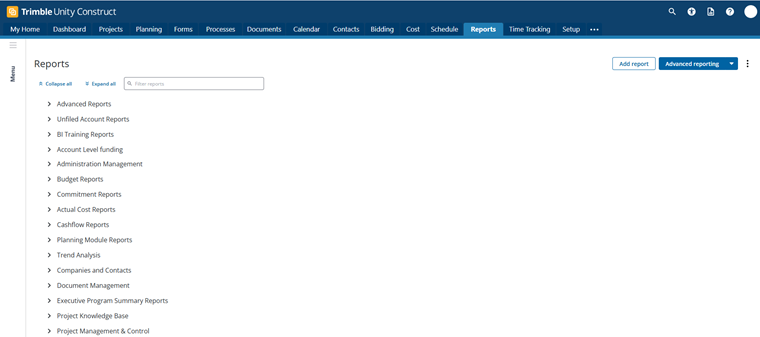
For more information, see the FAQ.
Resolved Cases
The following issues have been resolved:
Bidding
- Resolved an issue where imported folders were sorted incorrectly under the Bid Documents tab in the Bid module. Users will now see a consistent folder order in Bid Documents that matches the Documents module. (Case# 650183)
Cost
- Resolved an issue where processes were stuck in a conditional step due to a mail merge limit error. Future process instances will now proceed through conditionals without the mail merge limit error. (Case# 637359)
Documents
- Resolved an issue where users received an error message when trying to access the My Sessions tab in Bluebeam if the session name included quotations ("). Users can now view and access all session names without interruption. (Case# 642467)
Login Issues
- Bluebeam session creation failures were showing a generic error message that hid the real API error returned by Bluebeam. Users will now see a more meaningful error message explaining exactly why a session could not be created. (Case# 652131)
Mobile App
- Resolved an issue with session timeout configuration to prevent the mobile app from disconnecting prematurely. Users will now experience stable connections without unexpected timeouts. (Case# 653552)
Processes/ Workflow
- Updated process instance notifications to ensure that the email recipients see the same data field values that existed when the notification was originally created. (Case# 632738)
- Resolved an issue where the browser tab title was incorrectly displayed as My Draft Timesheets instead of Unfinished Drafts. The tab title now accurately displays as Unfinished Drafts. (Case# 634336)
- Resolved a discrepancy where the Master Invoice and Project Commitment Invoice displayed funding rules differently for zero-dollar items. The Master Invoice Funding Rules display now aligns with the Project Commitment Invoice behavior. (Case# 643378)
- Resolved an issue where the workflow publish date did not match the design workflow date. Users will now see the correct publish date displayed on the Workflow Designer page. (Case# 644777)
- Resolved an issue where some processes failed or became unresponsive at a conditional step due to a system conflict during dynamic cost column calculations. Workflows will now proceed past the conditional step without encountering errors. (Case# 645482)
Scheduled Task Engine
- Resolved an issue where scheduled tasks could remain stuck in an In Progress state after a server restart or service interruption. Tasks inactive for more than 8 hours will now automatically be marked as failed. This ensures task history remains accurate and prevents users from seeing tasks incorrectly displayed as running for days. (Case# 615289)